Building Premier League Match Official Assignments
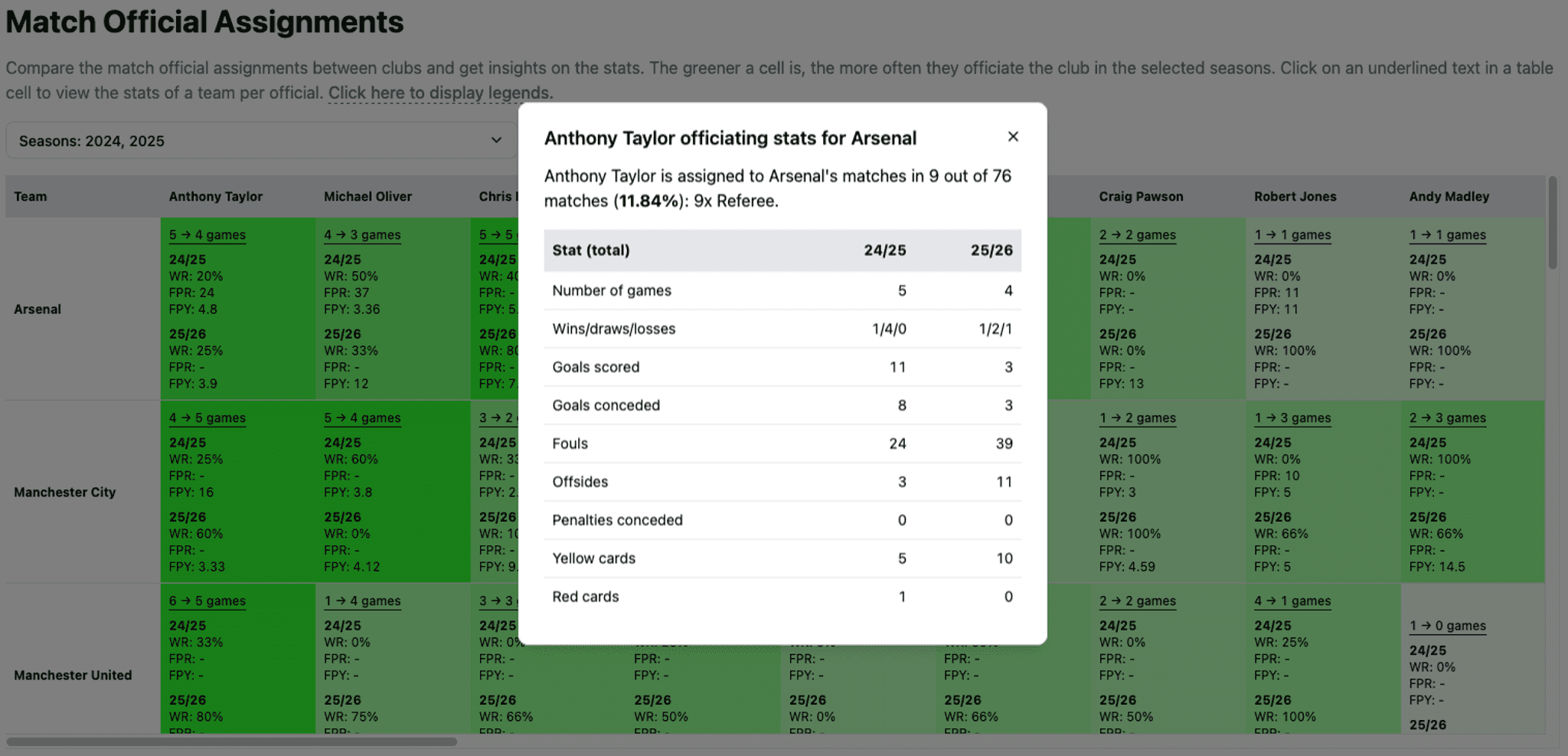
Table of Contents
- LLM use
- Motivation
- Finding the data
- Stitching the data
- Presenting the data
- User experience improvements
- Migrating to Understat and FBref
- Closing words
Hello! In this post, I’m going to share my experience, or rather, my thought flow when building Premier League Match Official Assignments. Let’s get going!
LLM use
First things first. You might ask, “Did you use an LLM to build this?” When building the initial versions, I only used it for debugging. Good ol’ copy-paste to ChatGPT and Claude free versions. Later on, when migrating off Premier League data sources to FBref and Understat, I used OpenCode Zen’s free models, which I think it was pretty effective, to my surprise. I mean, there were still areas that I had to point out or manually update, but it surpassed my expectations. Also, it also helped that it wasn’t as wordy as Claude. I don’t like LLMs that are too wordy. If we humans are lazy to read texts from other humans, how could we read texts generated by LLMs? But I digress.
Why did I do that [build manually first], you might ask again? Because I wanted to grasp the idea first. If I had a strong grasp of the idea, I would be able to steer the direction better, whether it was me or the LLM who implemented the thing. It also gave me some sort of “ownership”, which is probably scarce these days. It is even more scarce when people would just invoke “popular” skills or prompt “make it good and make no mistakes” kind of thing without going into the specifics.
That said, regardless of toolings, one can’t just simply build something without motivation.
Motivation
Like any other thing, when you want to do something, you must have just enough motivation to do it. Otherwise, it’s either you won’t see it through, you won’t be able to do it well, or you won’t be able to create an “attachment” to it.
In my case, my motivation was to know if a referee or a match official has a consistent bias against Arsenal. This is because in the 2024/25 season, there were at least 4 horrendous calls that resulted in an Arsenal player getting a red card, but the same rule was not applied to other teams when the same kind of foul happened. Those 4 calls were:
- Declan Rice vs. Brighton (home): second yellow card for “delaying the game”
- Leandro Trossard vs. Man City (away): second yellow card for “delaying the game”
- William Saliba vs. Bournemouth (away): direct red card for denying a goal-scoring opportunity
- Myles Lewis-Skelly vs. Wolves (away): direct red card for serious foul play (later overturned, to no one’s surprise)
Finding the data
Before building this page, I had already sourced my data from the official Premier League website. Yes, that was wrong. I realized it after reading several references, including the Premier League’s Terms of Use page. Keep in mind that I do not encourage in any way to do the same here, especially since now you know. In later sections, I also explain how I migrate the data sources. Below are the excerpt from the page:
The Website and App must not be used in any other way, including for commercial purposes, and you may not otherwise reproduce, re-utilise or redistribute it (including, by way of example, creating a database (electronic or otherwise) that includes material downloaded or otherwise obtained from the Website or App) …
The data are apparently available from calling PulseLive endpoints. Before building this match official assignments feature, I was only using match data (get season matches, then get the score from each). However, now I need more data: the match officials from each match and other match stats (offsides, fouls, penalties, number of yellow cards, number of red cards). Using all of these data, I was able to create “derived” stats such as the following.
- Win rates per team, per referee
- Fouls per yellow card per team, per referee
- Fouls per red card per team, per referee
Stitching the data
The stitching part was quite tough. Since I wanted the UX to be “free”, which means users should be able to view the data in the way they want, e.g., filter by seasons or filter by roles, I had to compute the stats in an optimized manner on the client-side (browser). I reached for my usual go-to: a ready-to-compute dictionary record? Basically, I prepared the data in a certain way, so that the consumer needs only to do the smallest amount of tasks. This was the data structure that I came up with:
- Team dictionary - Team name - Referee name - Referee: [match ID] - VAR: [match ID]Then, there is another dictionary that contains the stats:
- Match ID dictionary - Match ID - Number of fouls - Number of offsides - ...and so onUsing the above form, I was able to determine the number of times a team was officiated by a certain referee. I was also able to “associate” the match statistics with the match officials for a certain team dynamically, since each team-referee mapping only stores the match ID.
Presenting the data
Now that the data has been stitched, it’s time to package it for users… which is often the hardest part! Present too little, and users will get a lot of friction (from needing to do many interactions). Present too many, and users will be confused about where to look. The following was the initial look of the table.
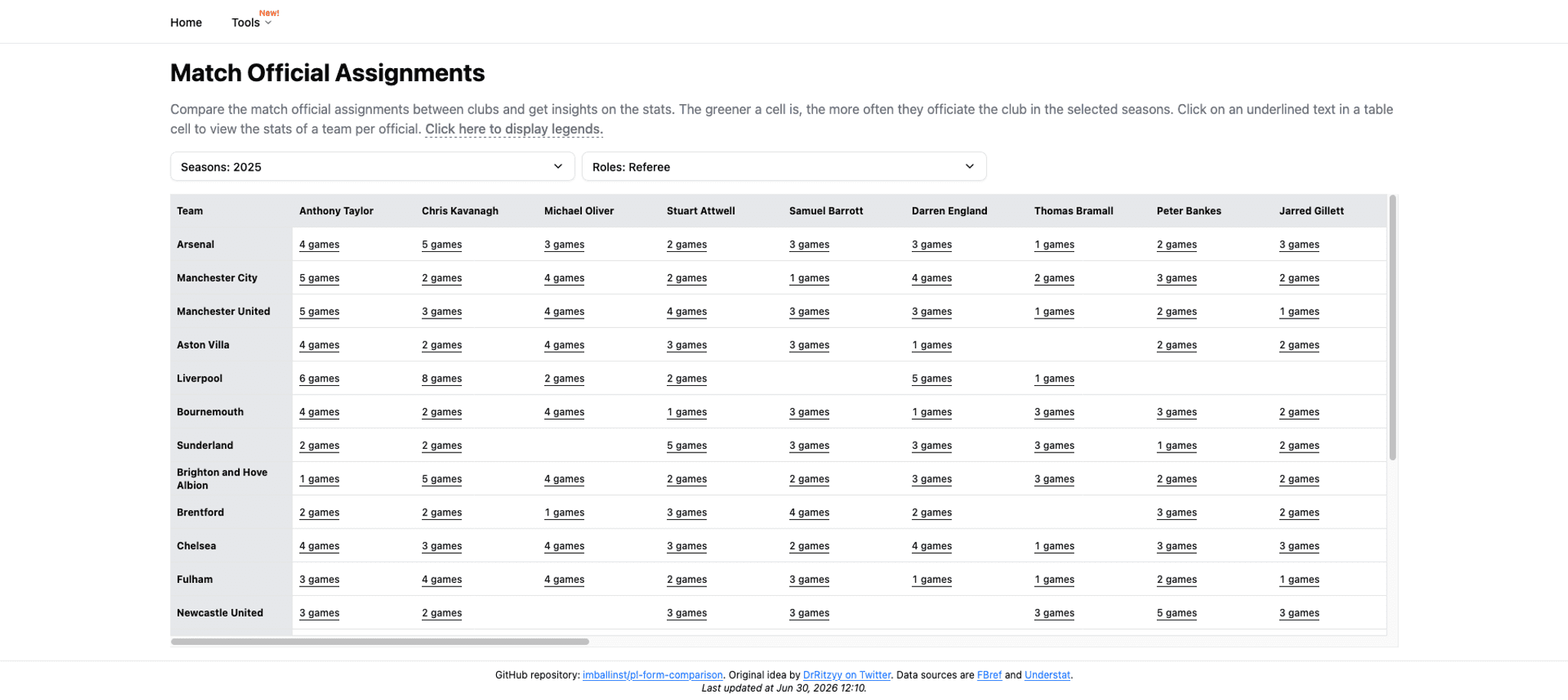
From the picture above, we can see that it only showed the number of games a team was officiated by a referee, with no further explanations. Looking at the table alone won’t cause a bulb to appear above our heads. This hinders our ability to decide which cell we want to dive deeper into. This “dive deeper” is done by clicking the number of games, which when clicked, it will show a dialog like the following picture.
The dialog contains various stats, such as the number of games the team is being officiated by the referee to the number of yellow/red cards given by the referee. Now, imagine if the user wants to see the win rate and fouls per referee per team, they have to click how many games? This is very inconvenient because the friction is very high.
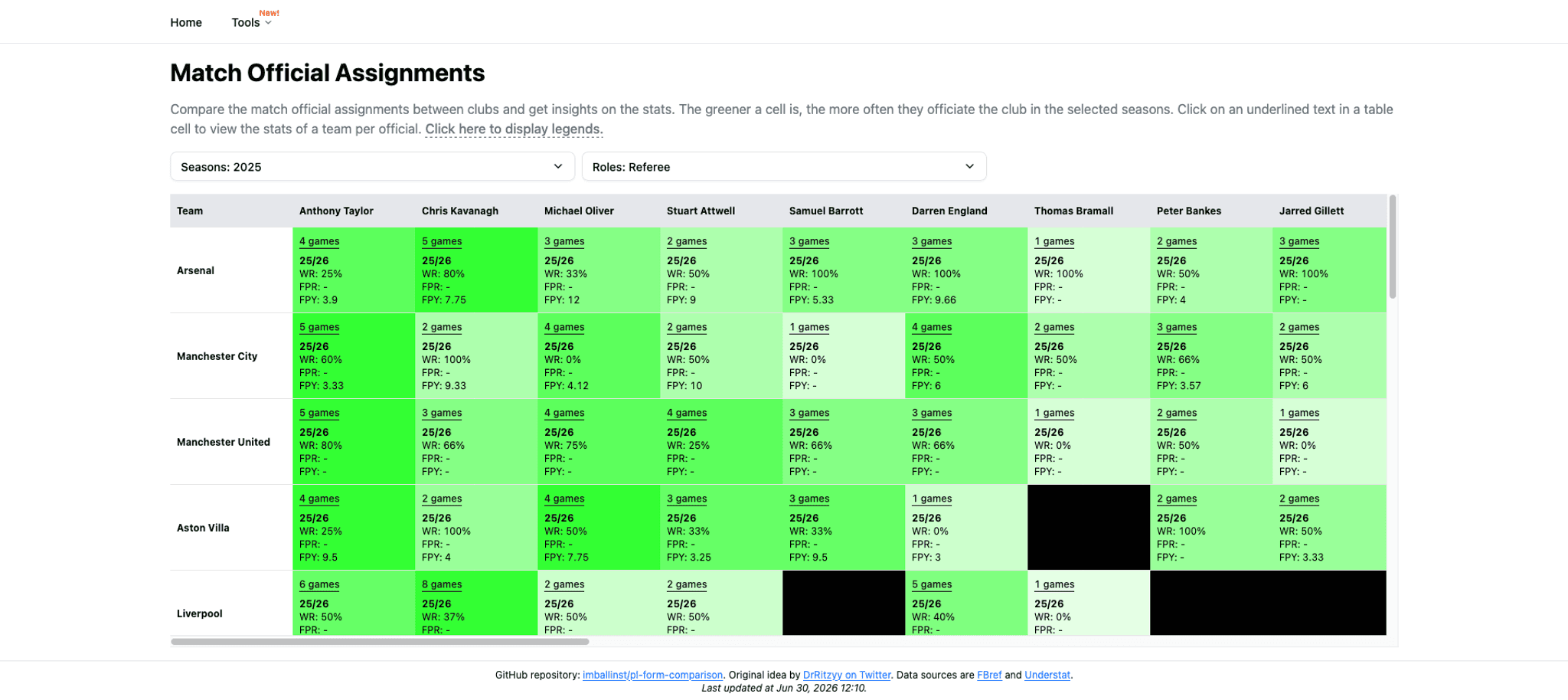
This was the interesting part. I initially wanted to show every stat in the cell, but it looked very “busy”. So, I opted for a few “derived” stats instead, such as win rates/fouls per yellow card/fouls per red card. I think it provides a good “bird’s-eye view,” which helps users to decide after looking at certain patterns.
Additionally, the green background of cells was added to indicate assignment frequency of a match official to a team. From the picture above, we can see that the most times someone refereed a team was 4-5 times. Those cells have the darkest green color in the row. This way, scanning is easier because we can just scan by color instead of by “parsing” the numbers.
Lastly, a referee who never officiated a team will have their table cell “blocked”. The purpose is similar: to make the table easier to scan. So, when we see a blocked cell, we can just skip past it and look at other cells.
User experience improvements
Sticky headers
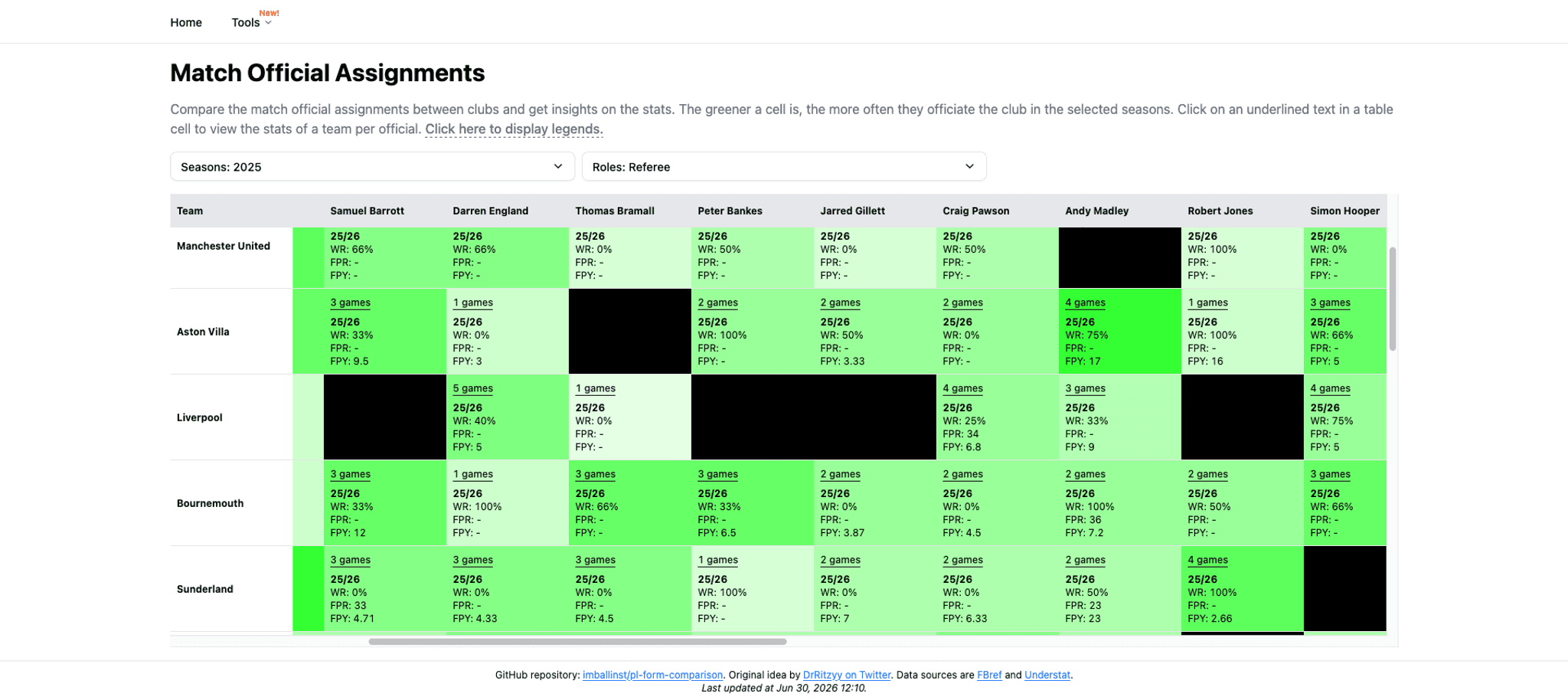
Since the table is big, when we scroll right or down enough, eventually the table headers (or the left-most cell) will be hidden, and we won’t be able to determine which cell is for which row/column. The fix is easy enough: for the table headers, we use `sticky top-0` whereas for the table’s first column, we use `sticky left-0`.
Controlling dialog states
In the first iterations, I utilized the approach of shadcn/ui’s Dialog component, which means every trigger is a sibling of the content, wrapped by a `<Dialog>` component.
<Dialog> <DialogTrigger>Open</DialogTrigger> <DialogContent> <DialogHeader> <DialogTitle>Are you absolutely sure?</DialogTitle> <DialogDescription> This action cannot be undone. This will permanently delete your account and remove your data from our servers. </DialogDescription> </DialogHeader> </DialogContent></Dialog>However, this approach isn’t really optimal when the table can be as big as 400 cells. Each cell must “compute” the stats from every referee-team map, and that caused a bit of performance downgrade when I updated the filters (it was like, around ~500ms freeze or something). So, I extracted those out of the table and used a single controlled `<Dialog>` component to contain the referee-team stats modal.
There was yet another issue. I noticed the “smoothness” of using custom-controlled triggers and states (by passing `open` and `onOpenChange` to `<Dialog>`) degraded heavily compared to using the “normal” approach above. Like, sometimes the dialog just appeared immediately (without transitions). Similar issues were reported in GitHub [1, 2, 3]. I ended up with a “hidden trigger” approach, something like:
<Button  className="flex gap-0.5 underline size-auto! p-0 text-xs"  variant="link"  size="sm"  data-ga-label="ga-official-assignments-view-referee-detail-button"  data-ga-value={`${name} - ${rowValue.name}`}  onClick={() => {    setSelectedCell([rowValue, name])    openDialogBtnRef.current?.click()  }}>  {seasons.map((season) => refereeData.perSeasonRecord[season]?.score ?? 0).join(' → ')} games</Button>
<DialogTrigger asChild>  <Button hidden ref={openDialogBtnRef} /></DialogTrigger>
This way, I can programmatically still trigger the dialog triggers with proper animations.
Virtualization
In the prior sections above, I mentioned that the table can be as big as 400 cells. Given that size and each cell might eat quite some space on the screen, it is certain that not all cells need to be rendered at a given time. The solution is virtualization: render only what’s shown in a given viewport. By doing this, we prevent the “repainting” process of the invisible table cells, further reducing the render duration when the query parameters change (because of seasons/roles filter changes).
After all the above improvements were implemented, what would have taken ~500ms to render (something like a browser freeze) after we update seasons/roles would now take nearly an instant to do so because of the improvements above.
Migrating to Understat and FBref
Alright, last part! I wrote above that I originally didn’t know about the Premier League’s Terms of Use (which I should have checked in the first place, probably). So, I decided to change the data source to Understat and FBref. This migration process was helped by OpenCode (first time trying OpenCode, by the way).
With me having a good grasp on how the feature should be, I knew what the input and output should be. I asked OpenCode Zen’s Big Pickle (the free model) to generate the migration scripts. I thought I would be able to do it all in TypeScript, but it would seem that the scraping ecosystem is more mature in Python. At the time of writing, I used Soccerdata to scrape FBref in accordance with their scraping rules (no more than 10 requests per minute). The scripts worked well enough, although as mentioned above, I had to make some further adjustments. Still, for a free model, the result was pretty good in my book.
The scraping process took a bit of time (38 matchweeks * 10 matches * 7 seconds ~= 44 minutes per season), but in the end, I managed to change the match results from Premier League data source to Understat; and the supporting data to use FBref. I am currently in the process of asking FBref whether I am allowed to use their data to create “derived data”; let’s see what their response is in the future.
If they don’t give me permission, I probably would just take down the supporting stats, which is very unfortunate, but it is what it is.
Closing words
Alright, that should be all. What can we learn from this post as a recap?
- OpenCode free models are surprisingly good
- The more attachment you have to a product, the better suggestions you can give
- Before using data from a certain source, try looking at the Terms of Use first (and see if we may request permission or not)
Hopefully this post is useful, and I’ll catch you all in the next one!